Clerk error
 Clerk
Clerk"@clerk/nextjs: Clerk keys are missing from your environment": the fix now that keyless mode is gone
"@clerk/nextjs: Clerk keys are missing from your environment." is the error clerkMiddleware() throws, as an HTTP 500 on every request, when neither NEXT_PUBLIC_CLERK_PUBLISHABLE_KEY nor CLERK_SECRET_KEY is set. Clerk removed keyless mode in @clerk/nextjs 7.8.0, released 2026-08-20: before that, a dev server with no keys ran on temporary keys Clerk made for you; now it throws, and the build still passes, so a deploy can look fine until the first visit. Fix it by setting both keys. Locally, run npx clerk@latest init, which writes them to .env.local without a Clerk account, or npx clerk@latest env pull for an existing app. On Vercel, add both to each environment that needs them (pk_live_ and sk_live_ keys for Production), then redeploy, since Vercel applies env var changes only to new deployments. Checked against Clerk's docs, changelog and SDK source on 2026-10-25.
Moving the app to production after this? Also read the Clerk production setup checklist.
The full message and its older wordings
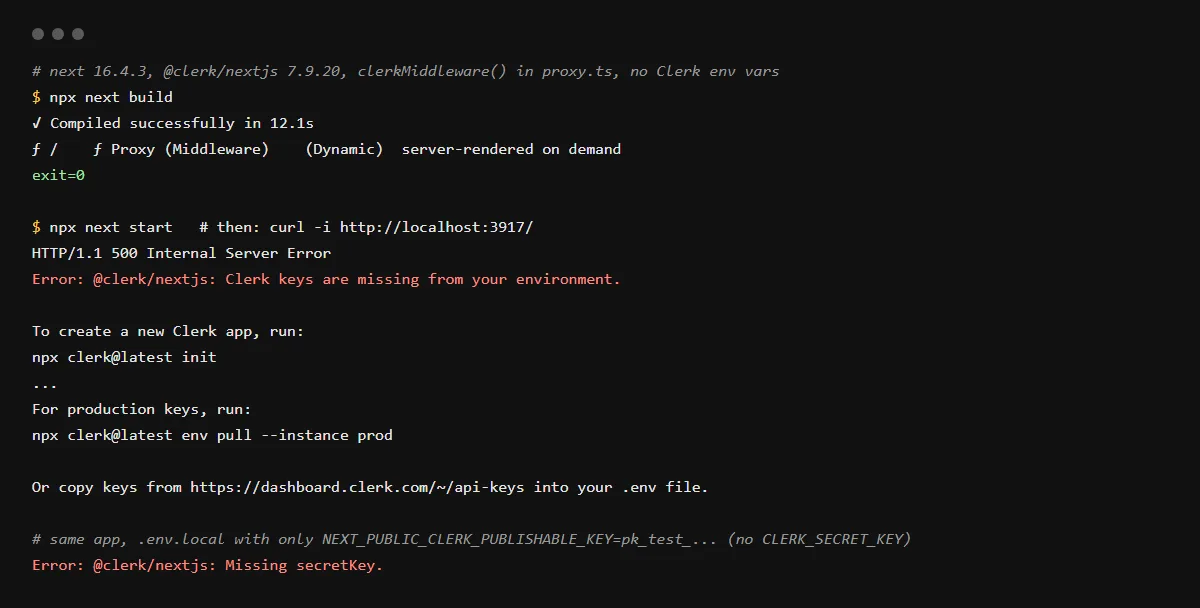
The text comes from Clerk's shared package, @clerk/shared, which @clerk/nextjs installs with a caret range, so the wording follows the shared version you have. The current one first shipped with @clerk/nextjs 7.9.6 on 2026-09-24. Between 7.8.0 and 7.9.5 the same error read "Missing publishableKey. To set up Clerk for this project, in your terminal run: npx clerk@latest init", and before that "Missing publishableKey. You can get your key at https://dashboard.clerk.com/last-active?path=api-keys." With only the publishable key set, it says "@clerk/nextjs: Missing secretKey." instead. We ran it on 2026-10-25 and got:
Error: @clerk/nextjs: Clerk keys are missing from your environment.

To create a new Clerk app, run:
npx clerk@latest init

'npx clerk@latest init' does not need a Clerk account and writes temporary dev keys.

To use an existing Clerk app, run:
npx clerk@latest link
npx clerk@latest env pull

For production keys, run:
npx clerk@latest env pull --instance prod

Or copy keys from https://dashboard.clerk.com/~/api-keys into your .env file.
What happened to keyless mode
Keyless mode arrived as an experiment in @clerk/nextjs 6.8.0 (2024-12-06) and became the default in 6.11.0 (2025-02-03): a dev server with no keys created a temporary Clerk app for you. 7.4.3 (2026-06-03) stopped it from starting in CI. 7.8.0 (2026-08-20) removed it, and the package changelog for that release says missing keys now throw an error that points to npx clerk@latest init. Apps that already had configured or claimed keys were unaffected, which is why a project that worked last month can fail after a fresh install with no .env.local.
It works locally but returns 500 on Vercel
Your keys are in .env.local, which is not committed, so the deployment has none. Add NEXT_PUBLIC_CLERK_PUBLISHABLE_KEY and CLERK_SECRET_KEY in the Vercel project's environment variables for Production and Preview, and redeploy. Clerk's docs say production keys do not work on the preview domain Vercel gives you, so Preview needs your development instance's pk_test_ and sk_test_ keys. Never put the secret key in a NEXT_PUBLIC_ variable.
Where to find the keys
In the Clerk Dashboard, on the API keys page (dashboard.clerk.com/~/api-keys). Since 2026-10-19 Clerk shows a secret key's full value only when you create it; if you lost it, add a new key and delete the old one. Development instance keys start with pk_test_ and sk_test_, production instance keys with pk_live_ and sk_live_.
Checklist
Set the Clerk keys everywhere the app runs
- 01Locally, for a new Clerk app, write development keys to .env.local:
npx clerk@latest init - 02For an existing Clerk app, link the project and pull its keys instead:
npx clerk@latest link npx clerk@latest env pull - 03Check that .env.local has both NEXT_PUBLIC_CLERK_PUBLISHABLE_KEY and CLERK_SECRET_KEY, then restart the dev server.
- 04In Vercel, open the project's Settings, Environment Variables, and add both names for Production with the production instance's pk_live_ and sk_live_ keys, and for Preview with the development keys.
- 05Redeploy. Open the deployed URL itself, not only the build log: the build passes without keys, and the error shows on the first request.
- 06List both names, without values, in .env.example so the next clone and the next agent know they are needed.
Related
Related guides


Sources
Official docs behind this checklist
- Clerk, Environment variables
- Clerk, Next.js quickstart
- Clerk, Deploy to production
- Clerk, Managing environments
- Clerk changelog, Core 3 (2026-03-03, with the keyless note)
- Clerk changelog, Secret keys are only shown once (2026-10-19)
- @clerk/nextjs CHANGELOG (6.8.0, 6.11.0, 7.4.3, 7.8.0)
- @clerk/shared, errorThrower.ts
- Vercel, Environment variables
Browse all launch guides · Read resources · How to make and check your next change
FAQ
FAQ for builders before launch
Can I turn keyless mode back on?
No. Clerk removed it in @clerk/nextjs 7.8.0. npx clerk@latest init is the replacement: it creates an app without a Clerk account and writes real development keys you can claim later.
Why did next build pass without the keys?
clerkMiddleware() checks the keys when a request comes in. In our run every route was dynamic, so nothing called Clerk during the build, and the error appeared on the first request.